19  Case Study: Public Policy and Program Evaluation

19.1 Introduction: Bringing the Toolkit Together in a Policy Setting

Across the previous chapters, we developed a broad descriptive toolkit for tabular data, from type-aware association measures and network representations to tree-based segmentation, ensemble summaries, and communication principles. This case study is an opportunity to use those components together in an end-to-end policy workflow.

Our aim is modest and practical. We study county-level socioeconomic indicators to understand how structural characteristics co-occur with poverty rates, and how descriptive patterns can support policy interpretation and program design. We focus on transparent summaries and segmentation rules, while keeping a clear distinction between predictive description and causal evaluation.

19.2 Policy Context and Analytical Objective

We use the midwest dataset from ggplot2, which contains county-level demographic and socioeconomic variables for U.S. Midwest states. Although this is not a program trial dataset, it reflects the kinds of administrative and survey indicators that often appear in policy analysis.

For this chapter, we treat percbelowpoverty (percent of individuals below the poverty threshold) as a policy-relevant outcome proxy. We ask three connected descriptive questions:

  1. Which variables show the strongest association with county poverty rates, in a mixed-type setting?
  2. How those associations organize into a multivariate network structure?
  3. Which interpretable county segments emerge from recursive partitioning?

These questions align with exploratory policy work where the immediate goal is targeting, profiling, and communication, not effect identification.

19.3 Data Preparation and Initial Profiling

We create a compact analysis table with both continuous and categorical variables. The mix of variable types lets us reuse the unified association logic introduced earlier in the book.

policy_raw <- ggplot2::midwest

policy_data <- policy_raw |>
    transmute(
        county,
        state,
        inmetro = factor(ifelse(inmetro == 1, "Metro", "Non-metro")),
        category = factor(category),
        popdensity = as.numeric(popdensity),
        log_popdensity = log1p(popdensity),
        percbelowpoverty = as.numeric(percbelowpoverty),
        perchsd = as.numeric(perchsd),
        percollege = as.numeric(percollege),
        percprof = as.numeric(percprof),
        percwhite = as.numeric(percwhite),
        percblack = as.numeric(percblack)
    ) |>
    drop_na()

nrow(policy_data)
[1] 437

Before moving to multivariate structure, we inspect a small baseline profile.

baseline_profile <- policy_data |>
    summarise(
        counties = n(),
        mean_poverty = mean(percbelowpoverty),
        sd_poverty = sd(percbelowpoverty),
        mean_college = mean(percollege),
        mean_professional = mean(percprof),
        mean_hsd = mean(perchsd)
    )

baseline_profile |>
    gt() |>
    cols_label(
        counties = "Counties",
        mean_poverty = "Mean poverty rate",
        sd_poverty = "SD poverty rate",
        mean_college = "Mean college share",
        mean_professional = "Mean professional share",
        mean_hsd = "Mean high school share"
    ) |>
    fmt_number(columns = -counties, decimals = 2)
Counties Mean poverty rate SD poverty rate Mean college share Mean professional share Mean high school share
437 12.51 5.15 18.27 4.45 73.97
policy_data |>
    group_by(inmetro) |>
    summarise(
        n = n(),
        mean_poverty = mean(percbelowpoverty),
        mean_college = mean(percollege),
        mean_density = mean(popdensity),
        .groups = "drop"
    ) |>
    gt() |>
    cols_label(
        inmetro = "County type",
        n = "N",
        mean_poverty = "Mean poverty rate",
        mean_college = "Mean college share",
        mean_density = "Mean population density"
    ) |>
    fmt_number(columns = c(mean_poverty, mean_college, mean_density), decimals = 2)
County type N Mean poverty rate Mean college share Mean population density
Metro 150 10.29 22.46 7,205.46
Non-metro 287 13.67 16.08 950.85

These summaries establish scale and heterogeneity, then the association analysis refines the structure in a pairwise and type-aware way.

19.4 Association Analysis for Mixed-Type Policy Variables

We assemble a mixed set of continuous and categorical variables and compute a unified association matrix with the following rules:

This keeps association values on a common nonnegative scale and supports network construction in the next step.

analysis_vars <- policy_data |>
    select(
        percbelowpoverty,
        perchsd,
        percollege,
        percprof,
        percwhite,
        percblack,
        log_popdensity,
        inmetro,
        category
    )

cramers_v <- function(x, y) {
    tab <- table(x, y)
    if (min(dim(tab)) < 2) {
        return(NA_real_)
    }

    chi2 <- suppressWarnings(chisq.test(tab, correct = FALSE)$statistic)
    n <- sum(tab)
    k <- min(nrow(tab), ncol(tab))
    as.numeric(sqrt(chi2 / (n * (k - 1))))
}

eta_squared <- function(y, group) {
    df <- tibble(y = y, group = as.factor(group))
    grand_mean <- mean(df$y, na.rm = TRUE)
    ss_total <- sum((df$y - grand_mean)^2, na.rm = TRUE)

    if (ss_total == 0) {
        return(NA_real_)
    }

    ss_between <- df |>
        group_by(group) |>
        summarise(n = n(), mean_y = mean(y, na.rm = TRUE), .groups = "drop") |>
        mutate(ss = n * (mean_y - grand_mean)^2) |>
        summarise(ss = sum(ss), .groups = "drop") |>
        pull(ss)

    as.numeric(ss_between / ss_total)
}

association_measure <- function(x, y) {
    if (is.numeric(x) && is.numeric(y)) {
        return(abs(cor(x, y, method = "spearman", use = "pairwise.complete.obs")))
    }

    if (is.factor(x) && is.factor(y)) {
        return(cramers_v(x, y))
    }

    if (is.numeric(x) && is.factor(y)) {
        return(eta_squared(x, y))
    }

    if (is.factor(x) && is.numeric(y)) {
        return(eta_squared(y, x))
    }

    NA_real_
}

var_names <- names(analysis_vars)
p <- length(var_names)

assoc_mat <- matrix(NA_real_, nrow = p, ncol = p, dimnames = list(var_names, var_names))

for (i in seq_len(p)) {
    for (j in seq_len(p)) {
        if (i == j) {
            assoc_mat[i, j] <- 1
        } else {
            assoc_mat[i, j] <- association_measure(analysis_vars[[i]], analysis_vars[[j]])
        }
    }
}

assoc_pairs <- as.data.frame(as.table(assoc_mat), stringsAsFactors = FALSE) |>
    rename(var1 = Var1, var2 = Var2, association = Freq) |>
    filter(var1 < var2) |>
    arrange(desc(association))

assoc_pairs |>
    slice_head(n = 12) |>
    gt() |>
    cols_label(
        var1 = "Variable 1",
        var2 = "Variable 2",
        association = "Association strength"
    ) |>
    fmt_number(columns = association, decimals = 3)
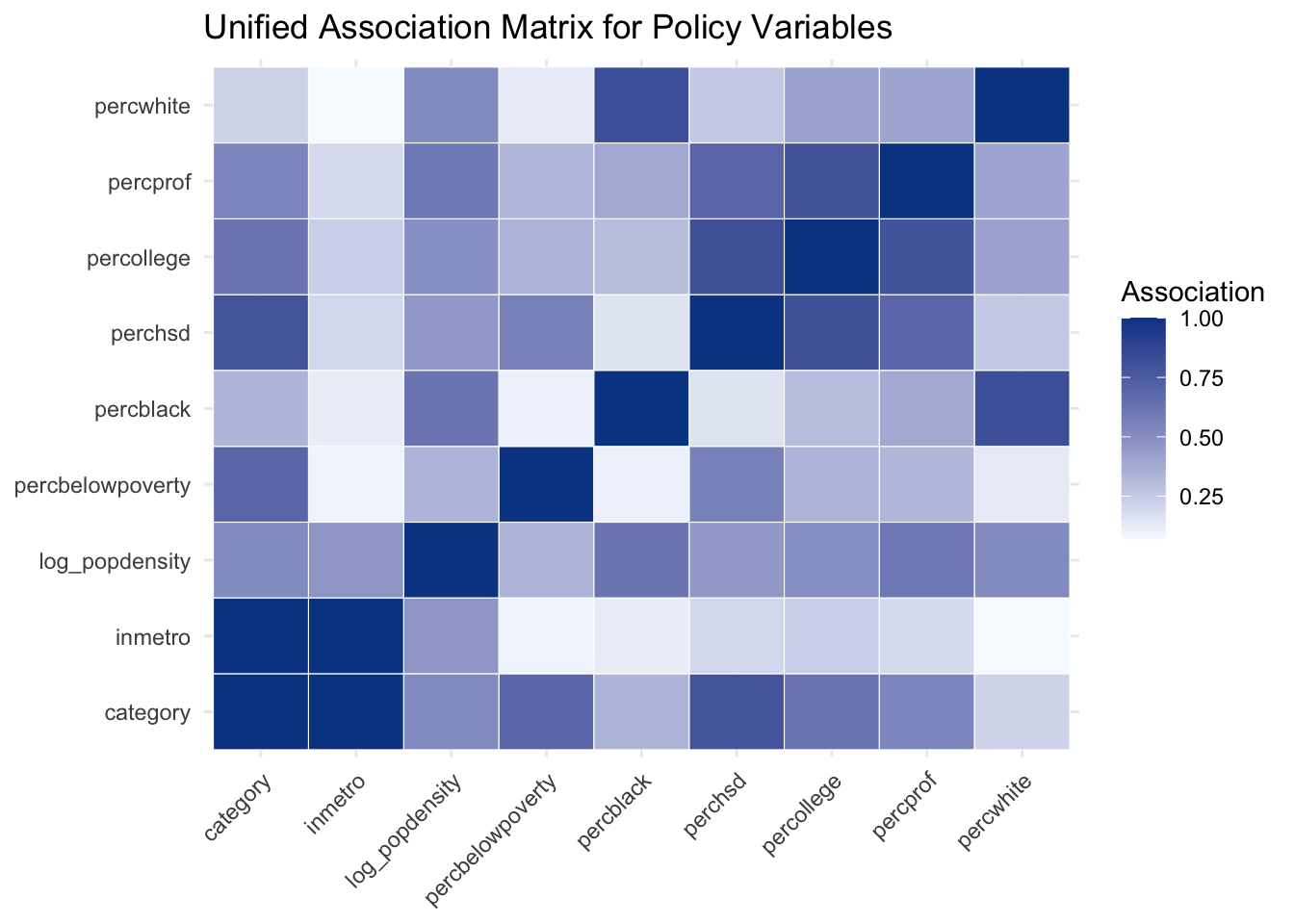
Variable 1 Variable 2 Association strength
category inmetro 1.000
percblack percwhite 0.821
perchsd percollege 0.810
percollege percprof 0.797
category perchsd 0.787
category percbelowpoverty 0.699
perchsd percprof 0.695
log_popdensity percblack 0.626
category percollege 0.622
log_popdensity percprof 0.608
percbelowpoverty perchsd 0.566
category percprof 0.545
assoc_plot_data <- as.data.frame(as.table(assoc_mat), stringsAsFactors = FALSE) |>
    rename(var1 = Var1, var2 = Var2, association = Freq)

assoc_plot_data |>
    ggplot(aes(x = var1, y = var2, fill = association)) +
    geom_tile(color = "white") +
    scale_fill_gradient(low = "#f7fbff", high = "#084594") +
    labs(
        title = "Unified Association Matrix for Policy Variables",
        x = NULL,
        y = NULL,
        fill = "Association"
    ) +
    theme_minimal() +
    theme(axis.text.x = element_text(angle = 45, hjust = 1))

Even in this compact analysis set, we can identify association blocks related to education, occupational structure, and racial composition. This pairwise view is informative, and the network representation helps us see the same structure at a systems level.

19.5 Network Representation of the Association Structure

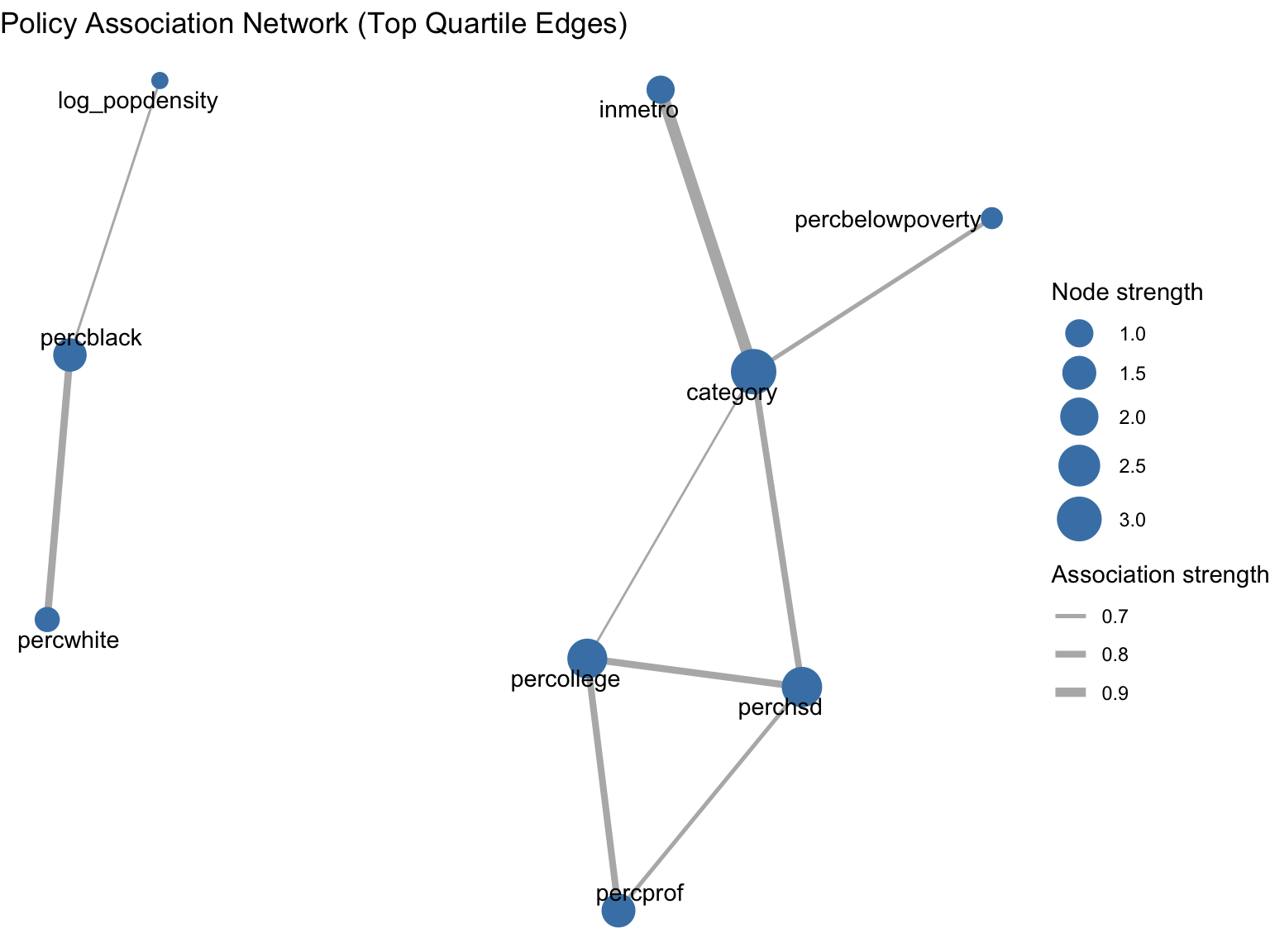
To avoid a fully dense graph, we retain only associations above the 75th percentile of off-diagonal association strengths. The resulting graph highlights the strongest links while preserving weighted edge information.

threshold <- quantile(assoc_pairs$association, probs = 0.75, na.rm = TRUE)

adjacency_weighted <- assoc_mat
adjacency_weighted[adjacency_weighted < threshold] <- 0
diag(adjacency_weighted) <- 0

policy_net <- graph_from_adjacency_matrix(
    adjacency_weighted,
    mode = "undirected",
    weighted = TRUE,
    diag = FALSE
)

tibble::tibble(
    statistic = c("Nodes", "Edges", "Density", "Threshold used"),
    value = c(
        vcount(policy_net),
        ecount(policy_net),
        edge_density(policy_net),
        as.numeric(threshold)
    )
) |>
    gt() |>
    cols_label(
        statistic = "Network statistic",
        value = "Value"
    ) |>
    fmt_number(columns = value, decimals = 3)
Network statistic Value
Nodes 9.000
Edges 9.000
Density 0.250
Threshold used 0.611
centrality_tbl <- tibble::tibble(
    variable = names(degree(policy_net)),
    degree = as.numeric(degree(policy_net)),
    strength = as.numeric(strength(policy_net, weights = E(policy_net)$weight)),
    betweenness = as.numeric(betweenness(policy_net, directed = FALSE, normalized = TRUE))
) |>
    arrange(desc(strength))

centrality_tbl |>
    gt() |>
    cols_label(
        variable = "Variable",
        degree = "Degree",
        strength = "Weighted degree",
        betweenness = "Normalized betweenness"
    ) |>
    fmt_number(columns = c(strength, betweenness), decimals = 3)
Variable Degree Weighted degree Normalized betweenness
category 4 3.108 0.250
perchsd 3 2.293 0.000
percollege 3 2.229 0.107
percprof 2 1.492 0.000
percblack 2 1.447 0.036
inmetro 1 1.000 0.000
percwhite 1 0.821 0.000
percbelowpoverty 1 0.699 0.000
log_popdensity 1 0.626 0.000
policy_tbl_graph <- as_tbl_graph(policy_net) |>
    activate(nodes) |>
    left_join(centrality_tbl, by = c("name" = "variable"))

ggraph(policy_tbl_graph, layout = "fr") +
    geom_edge_link(aes(width = weight), edge_alpha = 0.6, edge_colour = "gray50") +
    geom_node_point(aes(size = strength), color = "steelblue") +
    geom_node_text(aes(label = name), repel = TRUE, size = 3.8) +
    scale_edge_width(range = c(0.5, 2.5)) +
    scale_size_continuous(range = c(3, 9)) +
    labs(
        title = "Policy Association Network (Top Quartile Edges)",
        edge_width = "Association strength",
        size = "Node strength"
    ) +
    theme_void()

The network view supports a policy-oriented reading: variables that are central in this graph are those that connect multiple structural dimensions simultaneously. This can help prioritize which indicators are monitored together in reporting dashboards.

19.6 Tree-Based Segmentation of County Contexts

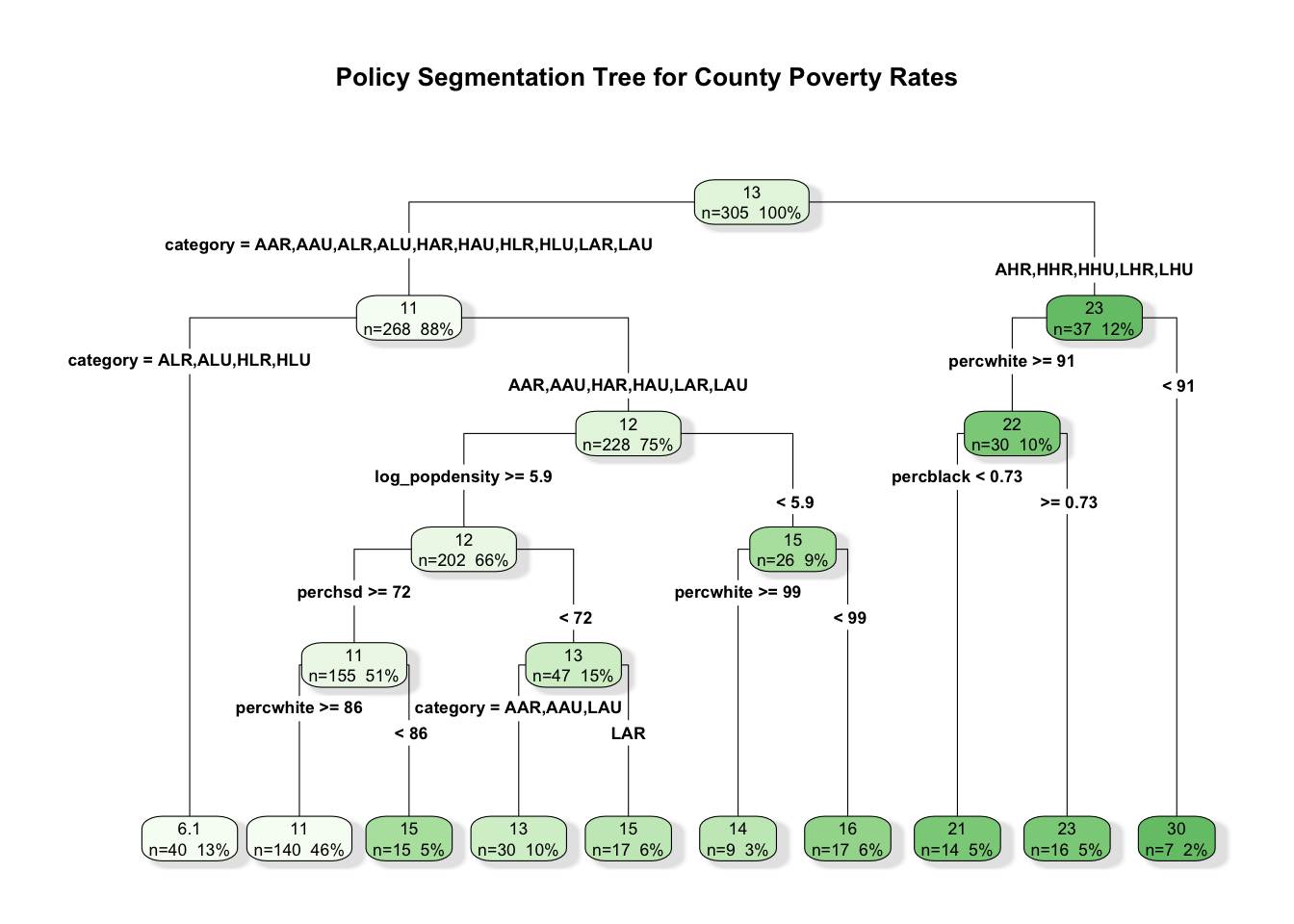
Pairwise and network summaries describe structure globally. We now turn to segmentation, using a regression tree to partition counties into interpretable groups with different average poverty rates.

set.seed(123)
idx_train <- sample(seq_len(nrow(policy_data)), size = 0.7 * nrow(policy_data))

train_policy <- policy_data[idx_train, ]
test_policy <- policy_data[-idx_train, ]

policy_formula <- percbelowpoverty ~
    perchsd + percollege + percprof + percwhite + percblack +
    log_popdensity + inmetro + category

tree_fit <- rpart(
    formula = policy_formula,
    data = train_policy,
    method = "anova",
    control = rpart.control(minsplit = 20, cp = 0.001, maxdepth = 5)
)

best_cp <- tree_fit$cptable[which.min(tree_fit$cptable[, "xerror"]), "CP"]
pruned_tree <- prune(tree_fit, cp = best_cp)

best_cp
[1] 0.001170203
rpart.plot(
    pruned_tree,
    type = 4,
    extra = 101,
    fallen.leaves = TRUE,
    box.palette = "Greens",
    branch.lty = 1,
    shadow.col = "gray90",
    main = "Policy Segmentation Tree for County Poverty Rates"
)

To keep the segmentation grounded, we compare out-of-sample RMSE for the pruned tree and a random forest fit on the same training split. The goal is not model competition, but a calibration check for segmentation stability.

rmse <- function(actual, predicted) {
    sqrt(mean((actual - predicted)^2))
}

tree_pred_test <- as.numeric(predict(pruned_tree, newdata = test_policy))
tree_rmse <- rmse(test_policy$percbelowpoverty, tree_pred_test)

set.seed(123)
rf_fit <- randomForest(
    formula = policy_formula,
    data = train_policy,
    ntree = 500,
    mtry = 3,
    importance = TRUE
)

rf_pred_test <- as.numeric(predict(rf_fit, newdata = test_policy))
rf_rmse <- rmse(test_policy$percbelowpoverty, rf_pred_test)

tibble::tibble(
    model = c("Pruned regression tree", "Random forest"),
    holdout_rmse = c(tree_rmse, rf_rmse)
) |>
    gt() |>
    cols_label(
        model = "Model",
        holdout_rmse = "Holdout RMSE"
    ) |>
    fmt_number(columns = holdout_rmse, decimals = 3)
Model Holdout RMSE
Pruned regression tree 2.440
Random forest 2.197

The tree remains our primary segmentation tool because it yields explicit rules. The ensemble result helps us gauge whether the tree captures a substantial part of the descriptive signal.

19.7 Segment Profiles and Policy Interpretation

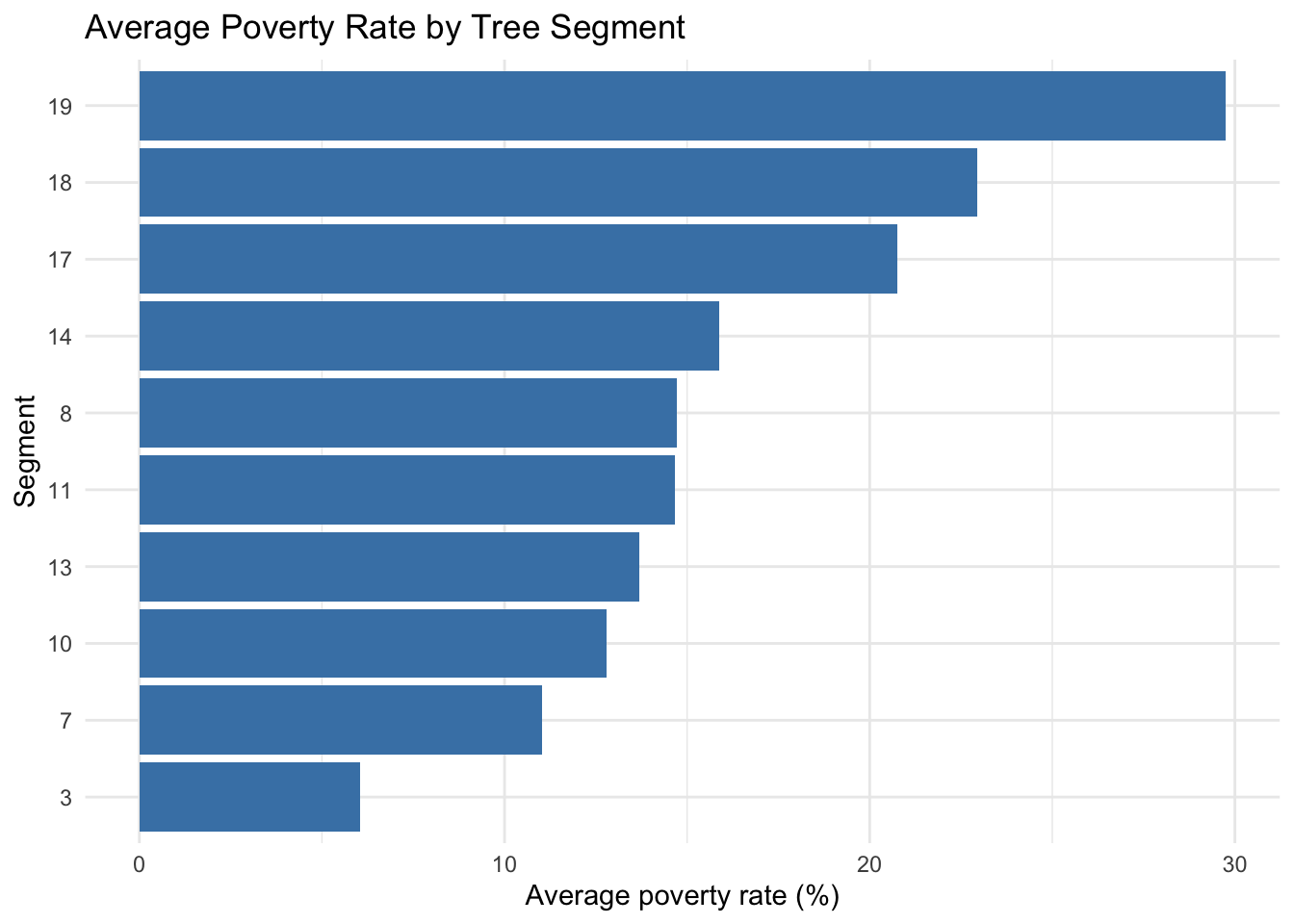
We summarize the leaves of the pruned tree on the training sample. The resulting profiles can support differentiated policy interpretation, for example by identifying segments where poverty is jointly associated with education and labor-market composition indicators.

train_with_leaf <- train_policy |>
    mutate(leaf = factor(pruned_tree$where))

segment_tbl <- train_with_leaf |>
    group_by(leaf) |>
    summarise(
        n = n(),
        mean_poverty = mean(percbelowpoverty),
        mean_college = mean(percollege),
        mean_prof = mean(percprof),
        mean_hsd = mean(perchsd),
        mean_density = mean(popdensity),
        metro_share = mean(inmetro == "Metro"),
        .groups = "drop"
    ) |>
    arrange(desc(mean_poverty))

segment_tbl |>
    gt() |>
    cols_label(
        leaf = "Segment",
        n = "N",
        mean_poverty = "Mean poverty rate",
        mean_college = "Mean college share",
        mean_prof = "Mean professional share",
        mean_hsd = "Mean high school share",
        mean_density = "Mean population density",
        metro_share = "Metro share"
    ) |>
    fmt_number(
        columns = c(mean_poverty, mean_college, mean_prof, mean_hsd, mean_density, metro_share),
        decimals = 2
    )
Segment N Mean poverty rate Mean college share Mean professional share Mean high school share Mean population density Metro share
19 7 29.75 16.06 4.00 65.73 556.49 0.00
18 16 22.94 17.61 5.24 68.85 1,405.95 0.12
17 14 20.76 11.82 2.76 63.10 670.65 0.07
14 17 15.88 16.44 3.47 71.96 260.96 0.00
8 15 14.73 25.60 7.17 76.71 25,466.27 0.93
11 17 14.66 12.04 2.92 63.98 853.64 0.00
13 9 13.69 15.18 2.86 70.25 289.07 0.00
10 30 12.80 14.38 3.32 70.18 1,216.41 0.30
7 140 11.03 18.88 4.50 76.04 2,403.97 0.33
3 40 6.05 21.62 5.26 79.20 4,449.43 0.68
segment_tbl |>
    ggplot(aes(x = reorder(leaf, mean_poverty), y = mean_poverty)) +
    geom_col(fill = "steelblue") +
    coord_flip() +
    labs(
        title = "Average Poverty Rate by Tree Segment",
        x = "Segment",
        y = "Average poverty rate (%)"
    ) +
    theme_minimal()

In policy settings, this kind of segmentation can help organize discussion around differentiated contexts rather than one average county profile. It can also support resource allocation conversations when combined with program costs and feasibility constraints.

19.8 Ensemble-Based Variable Stability Check

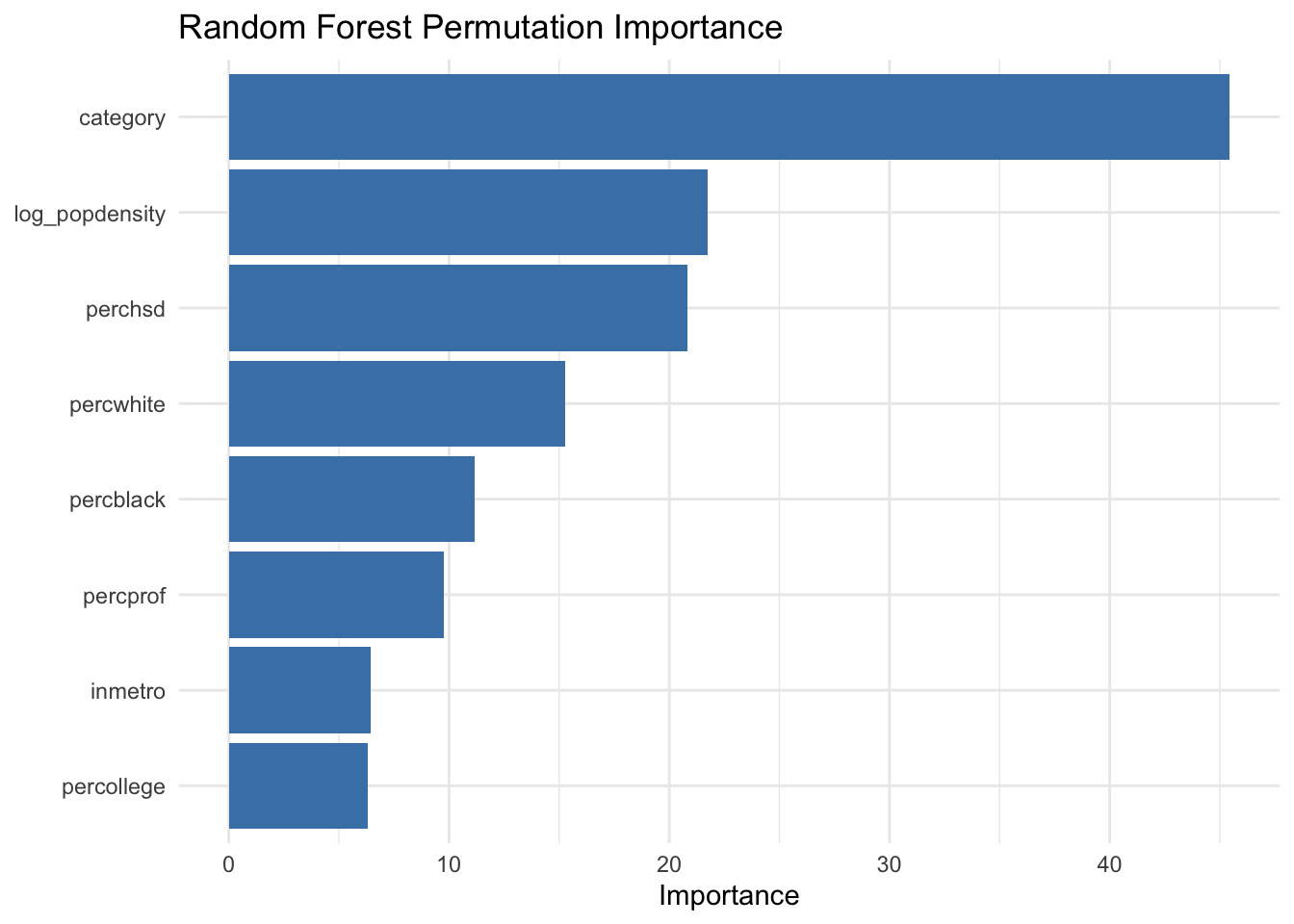
As discussed in the ensemble chapter (Chapter 12), variable importance from random forests can complement tree rules by indicating which predictors consistently contribute across many bootstrap samples.

importance_tbl <- tibble::tibble(
    variable = rownames(importance(rf_fit, type = 1)),
    rf_perm_importance = as.numeric(importance(rf_fit, type = 1)[, 1])
) |>
    arrange(desc(rf_perm_importance))

importance_tbl |>
    gt() |>
    cols_label(
        variable = "Variable",
        rf_perm_importance = "Permutation importance"
    ) |>
    fmt_number(columns = rf_perm_importance, decimals = 3)
Variable Permutation importance
category 45.456
log_popdensity 21.757
perchsd 20.846
percwhite 15.286
percblack 11.185
percprof 9.756
inmetro 6.430
percollege 6.327
importance_tbl |>
    ggplot(aes(x = reorder(variable, rf_perm_importance), y = rf_perm_importance)) +
    geom_col(fill = "steelblue") +
    coord_flip() +
    labs(
        title = "Random Forest Permutation Importance",
        x = NULL,
        y = "Importance"
    ) +
    theme_minimal()

When tree split variables and ensemble importance rankings point in similar directions, policy interpretation can be communicated with greater confidence. When they differ, that difference itself is informative and may suggest interaction effects or near-substitute predictors.

19.9 Communicating Descriptive Findings in Policy Work

This workflow supports several practical communication outputs:

  • a concise association ranking that clarifies which indicators move together,
  • a network map that highlights structurally central indicators,
  • a segment table that turns model structure into county profiles,
  • an ensemble stability check to contextualize split-based conclusions.

For non-technical stakeholders, these outputs are often easier to discuss than raw model objects. At the same time, careful wording remains important. We describe patterns in observed data and model behavior, while avoiding causal language unless a separate identification strategy is in place.

19.10 Limitations and Reproducibility Notes

Three limits are worth keeping in view.

  1. This is an observational dataset, so the analysis supports descriptive interpretation, not causal attribution.
  2. County-level indicators aggregate heterogeneous populations, which can mask within-county variation.
  3. Segmentation rules are sample-dependent, so stability checks and sensitivity analyses are useful in applied work.

For reproducibility, all random components in this chapter use explicit seeds. In practice, it is often helpful to report sensitivity across several seeds and threshold choices.

19.11 Summary and Key Takeaways

  • Mixed-type association measures provide a coherent starting point for policy tabular data.
  • Network representations help prioritize variables that connect multiple structural domains.
  • Regression trees translate multivariate structure into interpretable county segments.
  • Ensemble importance can be used as a stability lens for segmentation narratives.
  • Descriptive findings are most useful when presented as context for policy deliberation, not as definitive causal evidence.

19.12 Looking Ahead

This policy case study emphasized association structure, networks, and segmentation in administrative-style tabular data. The next case study shifts to public health and epidemiological analysis, where interactive exploration and interpretable machine learning will play a more central role in communicating results to broad stakeholder groups.