10  Regression Trees for Exploratory Segmentation

10.1 Introduction: From Associations to Segments

The previous chapters emphasized associations and their communication. A natural next step is to ask a different kind of question. Instead of summarizing global relationships, we may want to partition a dataset into interpretable subgroups and describe how outcomes differ across those groups. Regression trees provide a principled and transparent way to do so.

Regression trees are not only predictive tools. In descriptive analysis, their value comes from segmentation. They reveal how combinations of predictors define subpopulations with different outcome levels. This chapter focuses on that descriptive role, with careful attention to interpretation, stability, and communication.

10.2 The Regression Tree Idea

Regression trees approximate a complex relationship by recursively splitting the predictor space. Each split divides observations into two groups, and each terminal node, also called a leaf, predicts the outcome by the average within that leaf. The goal is to find splits that reduce within group variation.

At each step, the algorithm searches for a split that minimizes the residual sum of squares in the resulting partitions. For a single split, the criterion is (Breiman et al. 2017):

\[ RSS = \sum_{i \in L} (y_i - \bar{y}_L)^2 + \sum_{i \in R} (y_i - \bar{y}_R)^2, \]

where \(L\) and \(R\) are the left and right child nodes. This local optimization is repeated until a stopping rule is met.

Regression trees therefore trade smoothness for interpretability. They yield a piecewise constant approximation with clear decision rules, which is especially useful when we want to communicate who belongs to which segment.

10.3 A Reproducible Example with Housing Prices

We use the Boston housing dataset from the MASS package. The outcome is the median home value, medv, and we focus on a subset of predictors to keep the narrative compact.

data(Boston, package = "MASS")
glimpse(Boston)
Rows: 506
Columns: 14
$ crim    <dbl> 0.00632, 0.02731, 0.02729, 0.03237, 0.06905, 0.02985, 0.08829,…
$ zn      <dbl> 18.0, 0.0, 0.0, 0.0, 0.0, 0.0, 12.5, 12.5, 12.5, 12.5, 12.5, 1…
$ indus   <dbl> 2.31, 7.07, 7.07, 2.18, 2.18, 2.18, 7.87, 7.87, 7.87, 7.87, 7.…
$ chas    <int> 0, 0, 0, 0, 0, 0, 0, 0, 0, 0, 0, 0, 0, 0, 0, 0, 0, 0, 0, 0, 0,…
$ nox     <dbl> 0.538, 0.469, 0.469, 0.458, 0.458, 0.458, 0.524, 0.524, 0.524,…
$ rm      <dbl> 6.575, 6.421, 7.185, 6.998, 7.147, 6.430, 6.012, 6.172, 5.631,…
$ age     <dbl> 65.2, 78.9, 61.1, 45.8, 54.2, 58.7, 66.6, 96.1, 100.0, 85.9, 9…
$ dis     <dbl> 4.0900, 4.9671, 4.9671, 6.0622, 6.0622, 6.0622, 5.5605, 5.9505…
$ rad     <int> 1, 2, 2, 3, 3, 3, 5, 5, 5, 5, 5, 5, 5, 4, 4, 4, 4, 4, 4, 4, 4,…
$ tax     <dbl> 296, 242, 242, 222, 222, 222, 311, 311, 311, 311, 311, 311, 31…
$ ptratio <dbl> 15.3, 17.8, 17.8, 18.7, 18.7, 18.7, 15.2, 15.2, 15.2, 15.2, 15…
$ black   <dbl> 396.90, 396.90, 392.83, 394.63, 396.90, 394.12, 395.60, 396.90…
$ lstat   <dbl> 4.98, 9.14, 4.03, 2.94, 5.33, 5.21, 12.43, 19.15, 29.93, 17.10…
$ medv    <dbl> 24.0, 21.6, 34.7, 33.4, 36.2, 28.7, 22.9, 27.1, 16.5, 18.9, 15…
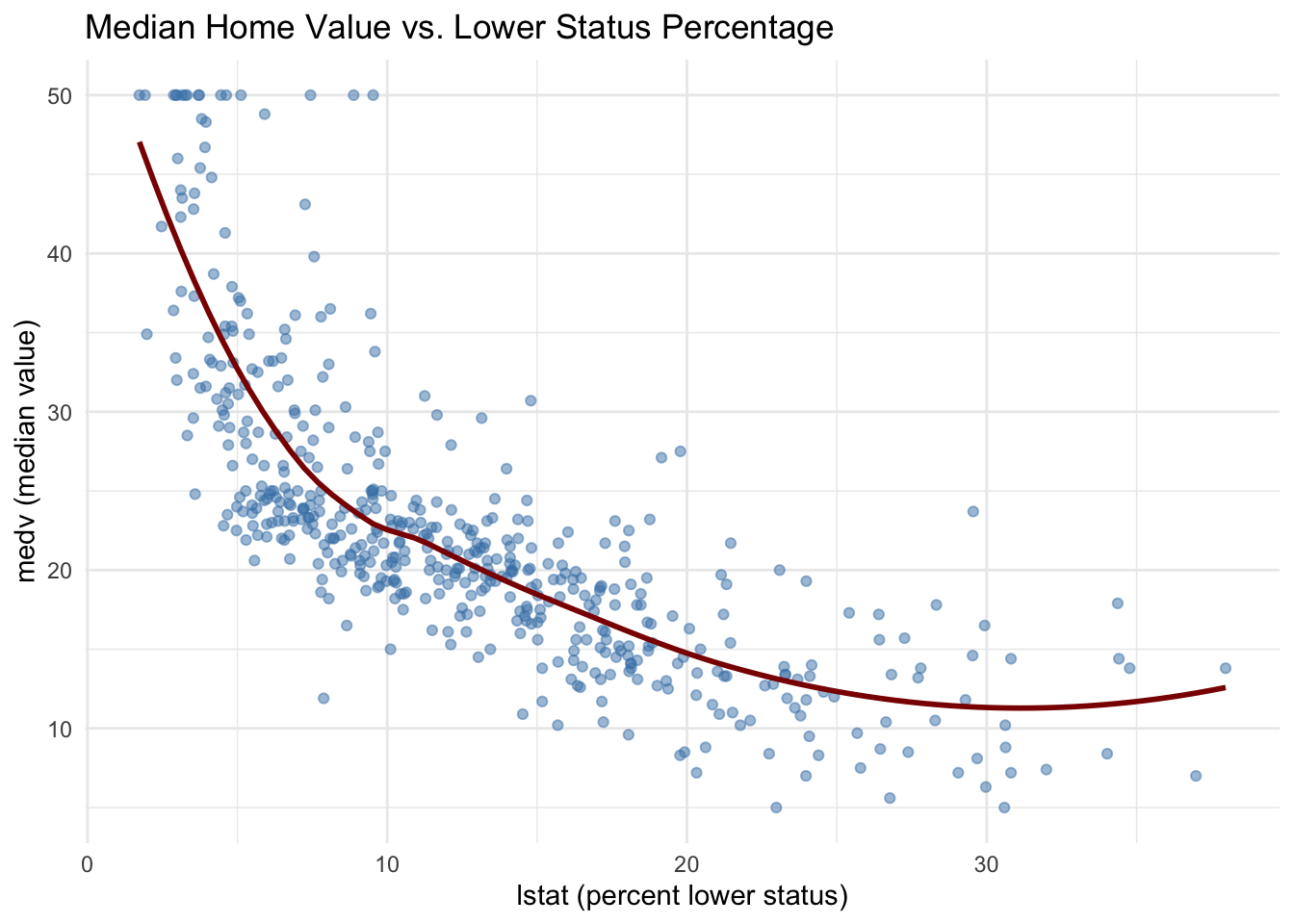
Before fitting a tree, we inspect a few relationships. This step is not strictly required, but it helps us connect the tree splits to familiar bivariate patterns.

Boston |>
    ggplot(aes(x = lstat, y = medv)) +
    geom_point(alpha = 0.5, color = "steelblue") +
    geom_smooth(method = "loess", se = FALSE, color = "darkred", linewidth = 1) +
    labs(
        title = "Median Home Value vs. Lower Status Percentage",
        x = "lstat (percent lower status)",
        y = "medv (median value)"
    ) +
    theme_minimal()

The nonlinearity in this relationship suggests that a tree, which allows different slopes in different regions, may provide an interpretable segmentation.

10.4 Fitting a Regression Tree

We fit a regression tree using rpart, which is designed for recursive partitioning. We set a modest minimum node size to avoid very small leaves and a small complexity parameter to grow a reasonably large initial tree.

set.seed(123)
tree_fit <- rpart(
    medv ~ lstat + rm + ptratio + indus + nox + crim,
    data = Boston,
    method = "anova",
    control = rpart.control(minsplit = 30, cp = 0.001)
)

The console printout is informative but not always easy to read in a narrative document. Instead, we focus on clearer outputs in the next sections, including pruning diagnostics, a modern tree visualization, and a compact segment summary.

10.5 Controlling Complexity and Pruning

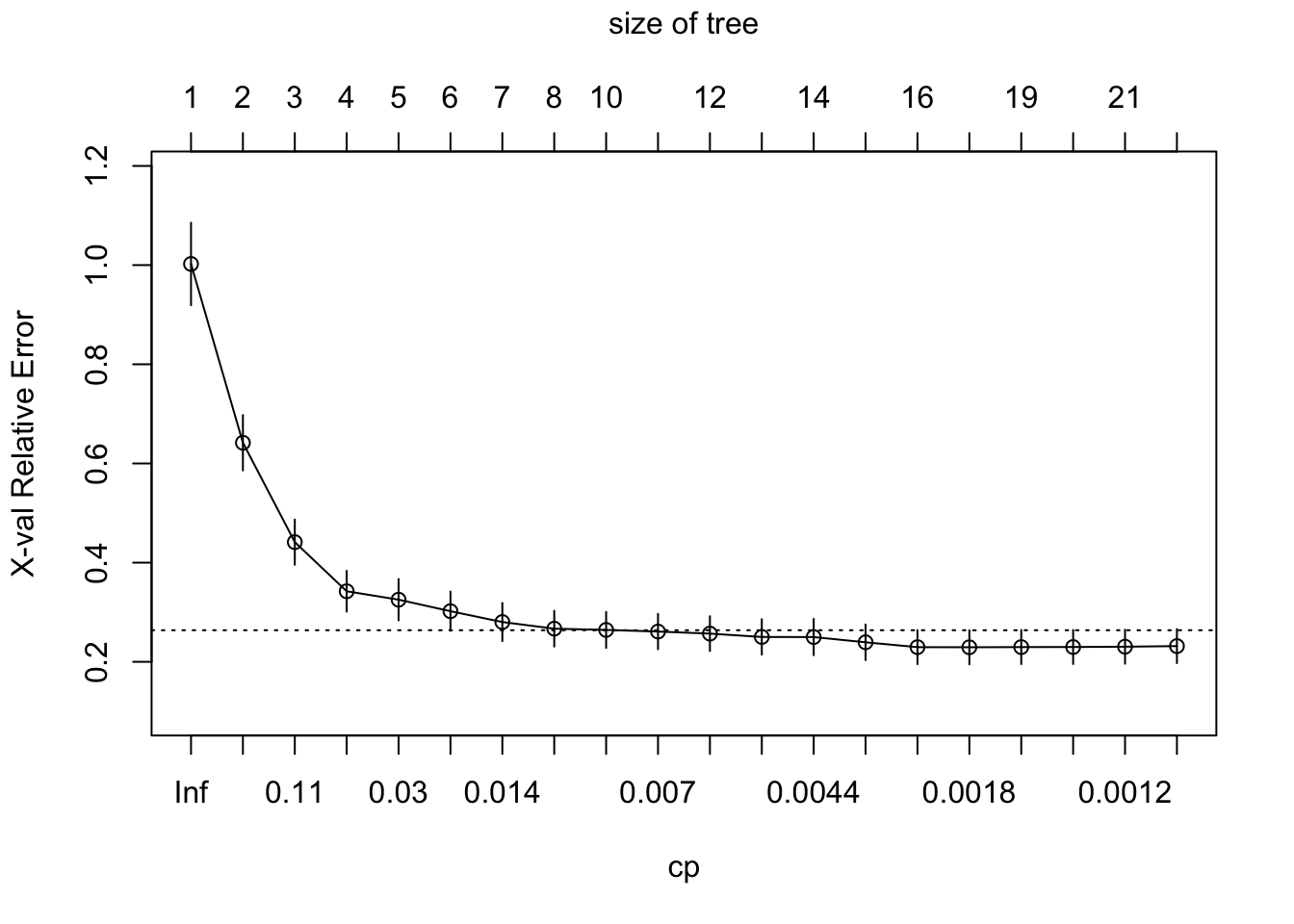
Large trees can be unstable and difficult to interpret. The rpart object includes cross-validated error estimates for a sequence of subtrees. We can inspect and select a complexity parameter that balances fit and interpretability.

printcp(tree_fit)

Regression tree:
rpart(formula = medv ~ lstat + rm + ptratio + indus + nox + crim, 
    data = Boston, method = "anova", control = rpart.control(minsplit = 30, 
        cp = 0.001))

Variables actually used in tree construction:
[1] crim    indus   lstat   nox     ptratio rm     

Root node error: 42716/506 = 84.42

n= 506 

          CP nsplit rel error  xerror     xstd
1  0.4527442      0   1.00000 1.00232 0.083091
2  0.1711724      1   0.54726 0.64177 0.055837
3  0.0716578      2   0.37608 0.44136 0.045649
4  0.0342882      3   0.30443 0.34229 0.041186
5  0.0266130      4   0.27014 0.32531 0.041755
6  0.0180237      5   0.24352 0.30207 0.039685
7  0.0105823      6   0.22550 0.28023 0.038437
8  0.0086921      7   0.21492 0.26684 0.036096
9  0.0072654      9   0.19753 0.26433 0.036373
10 0.0066497     10   0.19027 0.26103 0.035667
11 0.0061263     11   0.18362 0.25688 0.035097
12 0.0048053     12   0.17749 0.25013 0.035717
13 0.0039410     13   0.17269 0.24994 0.036574
14 0.0035366     14   0.16875 0.23937 0.035966
15 0.0022354     15   0.16521 0.22957 0.034303
16 0.0014183     16   0.16297 0.22935 0.034341
17 0.0013243     18   0.16014 0.22971 0.034359
18 0.0013053     19   0.15881 0.22986 0.034360
19 0.0011373     20   0.15751 0.23048 0.034359
20 0.0010000     21   0.15637 0.23170 0.034370
plotcp(tree_fit)

We select the complexity parameter that minimizes cross-validated error and prune the tree accordingly.

best_cp <- tree_fit$cptable[which.min(tree_fit$cptable[, "xerror"]), "CP"]
pruned_tree <- prune(tree_fit, cp = best_cp)

best_cp
[1] 0.001418281

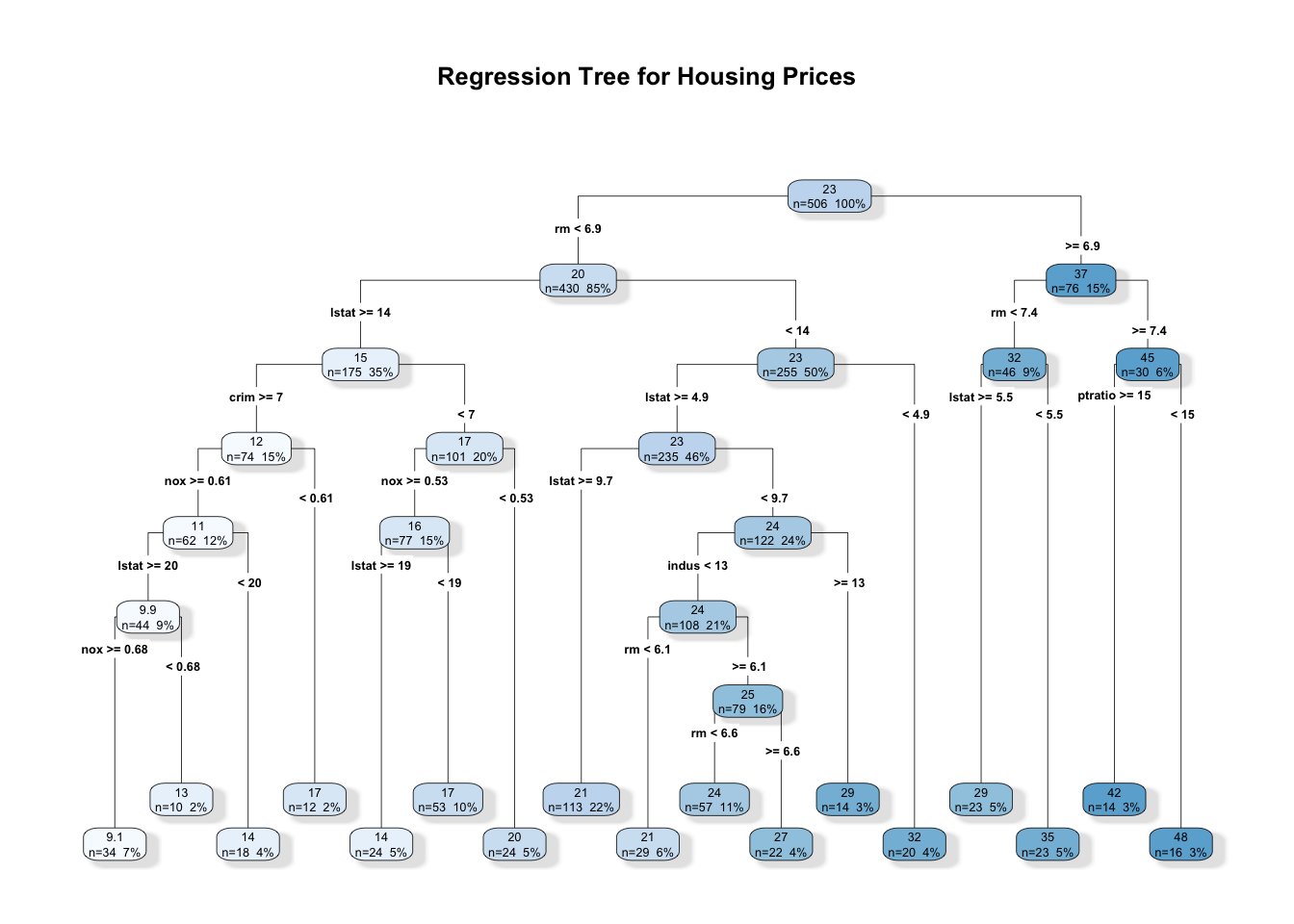
A compact visualization helps us communicate the segmentation. We use a clean tree plot that balances readability and detail without overwhelming the page.

rpart.plot(
    pruned_tree,
    type = 4,
    extra = 101,
    fallen.leaves = TRUE,
    box.palette = "Blues",
    branch.lty = 1,
    shadow.col = "gray90",
    main = "Regression Tree for Housing Prices"
)

The resulting tree provides a small number of segments with clear rules. It is often helpful to summarize the leaf characteristics numerically, which turns the tree into a compact descriptive table.

boston_nodes <- Boston |>
    mutate(node = factor(pruned_tree$where))

segment_summary <- boston_nodes |>
    group_by(node) |>
    summarise(
        n = n(),
        medv_mean = mean(medv),
        medv_sd = sd(medv),
        lstat_mean = mean(lstat),
        rm_mean = mean(rm),
        .groups = "drop"
    ) |>
    arrange(desc(medv_mean))

segment_summary |>
    gt() |>
    cols_label(
        n = "N",
        medv_mean = "Mean medv",
        medv_sd = "SD medv",
        lstat_mean = "Mean lstat",
        rm_mean = "Mean rm"
    ) |>
    fmt_number(columns = c(medv_mean, medv_sd, lstat_mean, rm_mean), decimals = 2)
node N Mean medv SD medv Mean lstat Mean rm
33 16 47.98 2.88 3.89 7.92
32 14 41.81 7.29 4.33 8.07
30 23 35.25 4.25 4.33 7.11
26 20 31.57 7.05 4.15 6.60
25 14 29.07 9.07 7.62 6.16
29 23 28.98 6.91 9.01 7.17
24 22 27.17 2.61 7.17 6.74
23 57 24.09 2.90 7.28 6.39
18 113 20.77 2.56 12.03 6.00
21 29 20.62 2.24 8.23 5.97
15 24 20.02 3.07 19.21 5.82
14 53 17.23 2.46 16.61 6.02
10 12 16.63 4.51 20.25 5.88
13 24 14.04 2.86 24.68 5.65
9 18 13.92 2.10 17.05 6.27
8 10 12.63 1.31 25.53 5.72
7 34 9.11 2.21 25.69 5.73

This table highlights how the segmentation aligns with substantive variables. For example, leaves with low lstat and higher rm tend to show higher average prices. The standard deviations remind us that even within a leaf, variation remains, so a tree is a simplification rather than a perfect partition.

10.6 Variable Importance as a Descriptive Lens

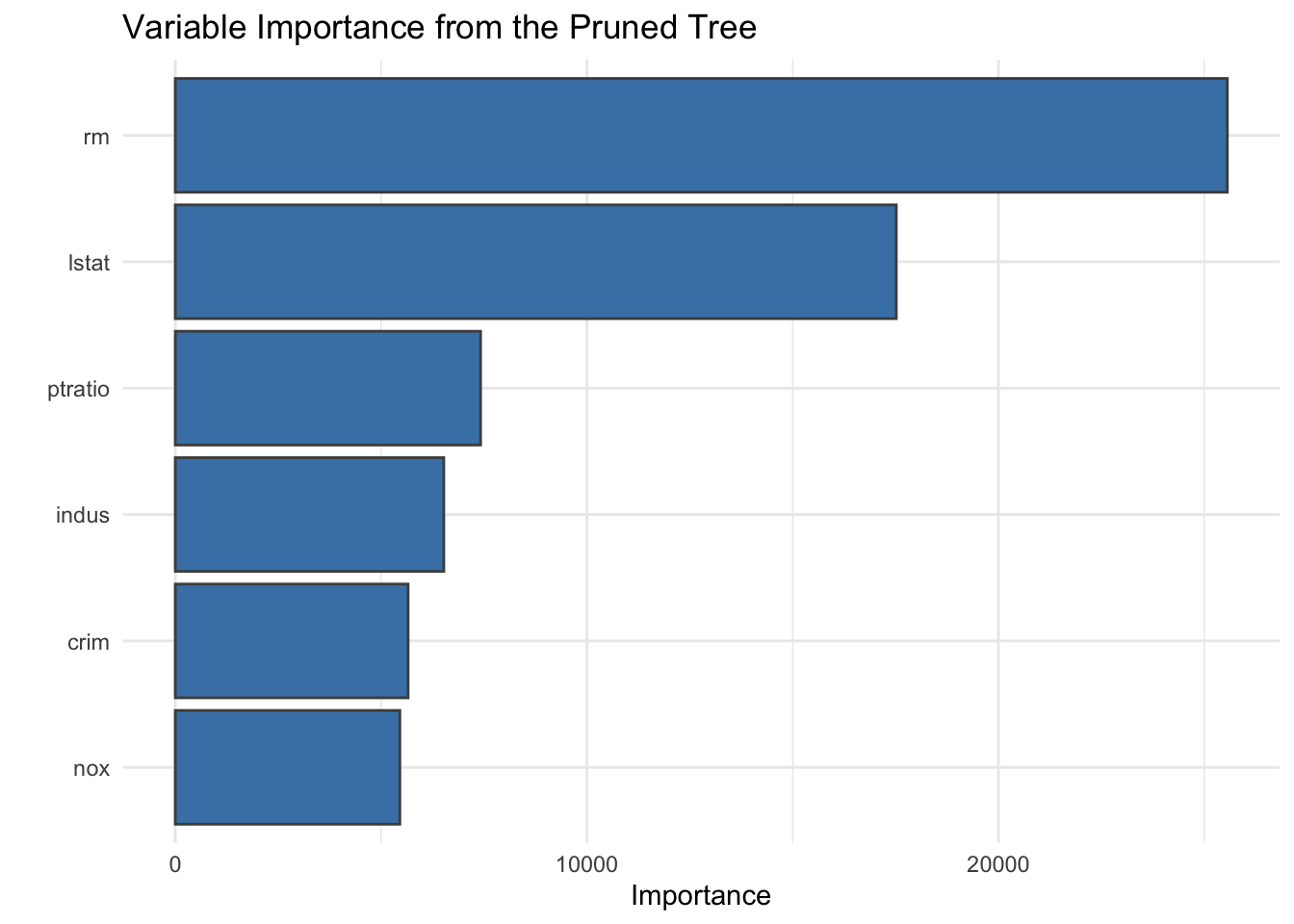
A tree already encodes which variables matter, but a variable importance plot can provide a concise summary of the relative contribution of predictors. This view complements the segmentation table by highlighting which variables the tree relied on most.

vip(pruned_tree, num_features = 6) +
    ggtitle("Variable Importance from the Pruned Tree") +
    geom_bar(stat = "identity", color = "gray30", fill = "steelblue") +
    theme_minimal()

In descriptive work, variable importance is best treated as a ranking rather than a precise scale. It helps us focus attention, while the split rules and segment summaries provide the substantive interpretation.

10.7 Interactive Tuning in Practice

Small changes in pruning parameters, such as cp, maxdepth, or the minimum number of observations per leaf, can noticeably change the tree. Interactive tools can make this trade-off tangible by allowing rapid adjustments and immediate feedback on the resulting segmentation. Even without a full application, we can adopt the same mindset in static analysis, choosing parameter values that balance interpretability and stability rather than maximizing fit alone.

10.8 Interpretation as Descriptive Modeling

Regression trees are often treated as predictive models, but in descriptive analysis we can read them as structured summaries:

  • Each split highlights a predictor that separates higher and lower outcome regions.
  • The order of splits suggests the relative importance of predictors in the segmentation.
  • Each leaf corresponds to a segment with a clear rule and a mean outcome.

This perspective is valuable when we need to explain findings to collaborators or stakeholders. Instead of presenting a regression table with coefficients, we can present a short set of decision rules and segment means. The interpretation is more discrete, but also more transparent.

10.9 Strengths and Limitations

Strengths

  • Interpretability, since each segment is defined by explicit rules.
  • Flexibility for nonlinear relationships and interactions without manual specification.
  • Natural alignment with exploratory goals, especially for segmentation and profiling.

Limitations

  • Instability, small changes in data can yield different trees.
  • Loss of smoothness, the model is piecewise constant.
  • Potential bias toward variables with many split points, which can influence variable importance.

In descriptive workflows, these limitations suggest a cautious stance. We can treat the tree as one lens among several, corroborating its segments with other summaries or sensitivity checks.

10.10 Summary and Key Takeaways

  • Regression trees provide interpretable segmentation for continuous outcomes, with each leaf defining a clear subgroup.
  • Pruning balances fit and readability, and cross validation offers a principled guide for tree size.
  • Tree plots and segment summaries communicate structure more effectively than raw console output.
  • Variable importance is a helpful ranking, but it gains meaning only when paired with split rules and segment profiles.

10.11 Looking Ahead

Regression trees focus on continuous outcomes. The next chapter extends the same logic to classification trees, where the outcome is categorical and performance is often summarized with a confusion matrix. The transition is conceptually smooth, with the same recursive partitioning framework and many of the same interpretive benefits.